


| Close Orders |
Contains table of Orders to include in the close, selection button to include or exclude orders, and buttons to continue the close process. Users must have a role of Manager to be able to view and access Closeout functions Note - The Closeout process submits each agencies closeout to a queue. The length of time to complete a closeout may vary depending on the number of closeouts in the queue. |
|
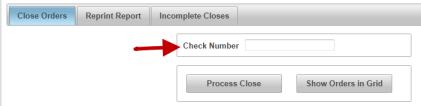
Note - Agencies that close with a check will also see the Check Number line. The Check Number is the number listed on the pre printed VitalChek check paper
|
|
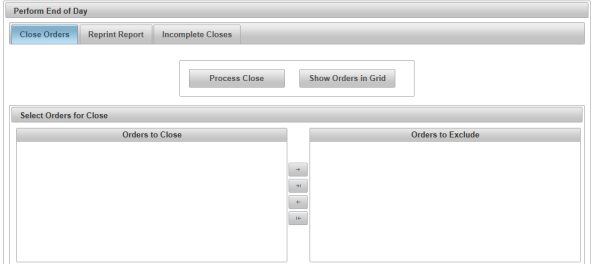
| Process Close | Button to continue processing the close |
| Show Orders in Grid | Button to display orders available to include the close |
| Orders to Close table | Table that displays all orders available for the close. Orders that are in this table will be included in the close process |
| Orders to Exclude table | Table the displays all available orders that will be excluded from the close process |
|
Exclude
|
Button that moves selected orders from the Orders to Close table to the Orders to Exclude table to be excluded from the close process |
|
Exclude All
|
Button that moves all available orders from the Orders to Close table to the Orders to Exclude table to be excluded from the close process |
|
Include
|
Button that moves orders from the Orders to Exclude table to the Orders to Close table to be included in the close |
|
Include All
|
Button that moves all orders from the Orders to Exclude table to the Orders to Close table to be included in the close |


