| How to Cancel an Order |
Orders can be cancelled at any time until they have been paid. Once an order has a paid-in-full status, the payment must be voided, and then the order can be cancelled. |
| Step 1 |
View the order to be Cancelled in one of the Order Create tabs (Order Details, Correspondence, Order Summary, Comments or Attachments)
|
| Step 2 |
Click the Cancel Order button
|
| Step 3 |
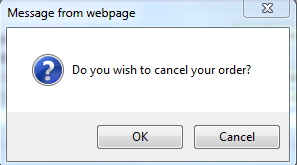
Cancel Order message is displayed. Click OK to confirm.
|
| Step 4 |
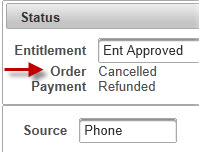
Order is cancelled and Order Status changes to Cancelled
|